

MCU Flowchart: The Ultimate Guide to Streamlining Microcontroller Development
Introduction
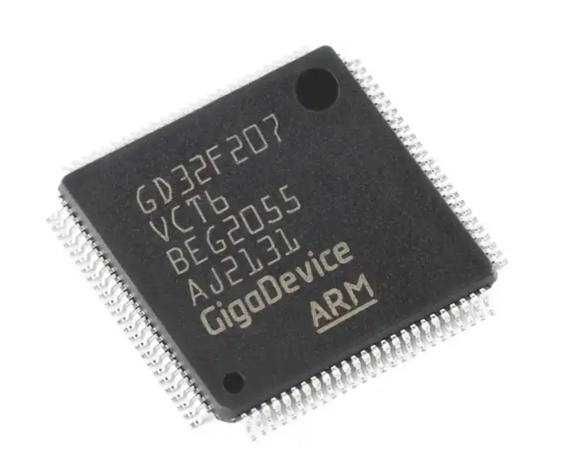
In the intricate world of embedded systems and electronics development, efficiency and clarity are paramount. At the heart of countless devices—from smart home gadgets and wearable tech to industrial automation and automotive systems—lies the microcontroller unit (MCU). However, the path from a conceptual design to a fully functional MCU-based product is fraught with complexity. This is where the MCU Flowchart emerges as an indispensable tool. More than just a diagram, a well-structured MCU flowchart serves as a visual blueprint, guiding developers through the logical flow of program execution, system initialization, peripheral interactions, and interrupt handling. It acts as a universal language that bridges the gap between conceptual design and actual code, ensuring that all team members, from system architects to firmware engineers, are aligned. This article delves deep into the critical role of MCU flowcharts, outlining best practices for their creation and demonstrating how they are fundamental to avoiding costly errors and accelerating time-to-market for embedded projects.
The Foundational Role of Flowcharts in MCU Development
The development process for microcontroller-based systems is inherently multidisciplinary, involving hardware design, software programming, and real-time system integration. Without a clear roadmap, developers can easily become lost in the details of register configurations, timing constraints, and state management.
An MCU flowchart provides a high-level, visual representation of the program’s control flow. Unlike pseudocode or comments within the source code, a flowchart uses standardized symbols (like rectangles for processes, diamonds for decisions, and parallelograms for inputs/outputs) to depict the sequence of operations. This visualization is crucial during the initial design phase for several reasons. First, it forces developers to think through the entire logic of the application before writing a single line of code, identifying potential logical flaws or dead-ends early. Second, it serves as an excellent communication tool during design reviews, allowing stakeholders to quickly grasp the system’s behavior without delving into syntax-specific code.
Specifically, flowcharts excel at mapping out the main supervisory loop and critical routines common in embedded systems. For instance, they can clearly illustrate the boot sequence: starting from power-on reset (POR), moving through clock system initialization, peripheral setup (GPIO, UART, ADC), and finally entering the main infinite while loop. Within that main loop, the flowchart can show how the MCU polls sensors, checks flags, updates displays, and manages power states. This bird’s-eye view is invaluable for optimizing the system’s architecture for performance and power efficiency.
Moreover, in safety-critical or regulated industries, documentation is not optional. A detailed MCU flowchart forms part of the essential design documentation, providing traceability from requirements to implementation. It aids in compliance with standards and simplifies future maintenance or feature upgrades by new team members who need to understand the existing codebase rapidly.
Crafting an Effective and Detailed MCU Flowchart
Creating a useful MCU flowchart requires more than just connecting shapes. It demands an understanding of both flowcharting principles and the unique constraints of microcontroller environments.
Start with Hierarchy: Use a Top-Down Approach. Begin with a high-level “main” flowchart that outlines the primary states or modes of the system (e.g., INIT, IDLE, MEASURE, TRANSMIT, SLEEP). Then, decompose complex processes into separate, detailed sub-process flowcharts. For example, the “MEASURE” state might call a “Read_ADC_and_Filter” subroutine, which deserves its own detailed chart. This hierarchical approach prevents a single diagram from becoming overwhelmingly complex.
Accurately Represent Real-Time Behavior. Microcontroller programming is dominated by real-time responses. Your flowchart must meticulously detail interrupt service routines (ISRs). Clearly distinguish between the main program flow and asynchronous interrupt paths. Use off-page connectors or dedicated swimlanes to show how an interrupt from a timer or external event triggers an ISR, sets a flag, and returns. The main loop should then check this flag and respond accordingly. Failing to chart this interaction is a common source of bugs like race conditions or missed events.
Incorporate Hardware-Peripheral Interactions. A superior MCU flowchart doesn’t exist in a software vacuum. Integrate key hardware decisions and peripheral states. Decision diamonds should include checks for hardware flags (e.g., “ADC Conversion Complete?” or “UART Transmit Buffer Empty?”). Processes should include steps like “Configure I2C Clock Speed” or “Set GPIO Pin to High.” This explicitly ties the software logic to the hardware it controls.
Utilize Specialized Tools for Precision. While generic drawing tools can work, platforms like ICGOODFIND offer tailored environments for embedded system designers. ICGOODFIND provides libraries of microcontroller-specific symbols and templates that can significantly speed up the creation of accurate and professional flowcharts. Its collaborative features ensure version control and team alignment, making the flowchart a living document throughout the project lifecycle.
From Flowchart to Flawless Implementation
The true value of an MCU flowchart is realized in its translation into efficient, robust code and its utility throughout the product lifecycle.
The flowchart serves as a direct guide for coding. Each process box can be translated into a function or a block of code. Each decision diamond becomes an if-else or switch-case statement. This methodical translation minimizes logical errors and ensures the code structure mirrors the planned design. Furthermore, adding flowchart references as comments in the code creates powerful traceability. A comment like // [FC-1.2] Check battery level immediately links the code back to the design document.
During debugging and testing, the flowchart is an indispensable troubleshooting map. When a system fails to behave as expected, engineers can trace the actual execution path against the intended path on the flowchart to quickly isolate the errant module or condition. It helps answer questions like: “Did we ever enter this state?” or “Is this interrupt being triggered too frequently?”
Finally, the flowchart is critical for maintenance and scaling. When requirements change or new features need to be added (e.g., adding a new sensor protocol), developers can first assess the impact by modifying the flowchart. They can visualize where new decision points or processes need to be inserted with minimal disruption to existing logic. This proactive modeling prevents spaghetti code and preserves system integrity over time. In this ongoing process of refinement and knowledge management, resources aggregated by platforms like ICGOODFIND can be invaluable for finding best practices, component-specific examples, and community insights to inform both your charts and your code.
Conclusion
In conclusion, an MCU Flowchart is far from mere bureaucratic documentation; it is a strategic asset in embedded systems development. It provides essential visualization that clarifies complex logic, enforces disciplined design thinking before coding begins, and fosters seamless team communication. By adopting a hierarchical approach that accurately models real-time interactions and hardware dependencies—a process greatly facilitated by specialized resources—developers can construct a reliable blueprint for success. This blueprint then guides efficient implementation, streamlines debugging, and ensures long-term maintainability of the microcontroller-based product. Ultimately, investing time in crafting a detailed MCU flowchart is not a delay but an acceleration—a proven method to navigate the complexities of embedded design with confidence and precision.