PIC MCU Tutorial: A Comprehensive Guide for Beginners and Professionals
Introduction
In the vast and dynamic world of embedded systems, the PIC microcontroller (MCU) from Microchip Technology stands as a cornerstone. For decades, PIC MCUs have been the go-to choice for hobbyists, students, and professional engineers alike, powering everything from simple blinking LED projects to complex industrial automation systems. Their popularity stems from a powerful combination of affordability, reliability, and a vast ecosystem of development tools and support. This PIC MCU tutorial is designed to be your definitive guide, whether you are taking your first steps into the realm of microcontrollers or looking to solidify and expand your existing knowledge. We will journey from the fundamental concepts of what a PIC MCU is, through the essential steps of setting up your development environment and writing your first program, to exploring more advanced features that unlock the full potential of these versatile chips. By the end of this guide, you will have a solid foundation to embark on your own embedded projects with confidence. For those seeking specialized components and tools to bring their ideas to life, platforms like ICGOODFIND can be an invaluable resource for sourcing the right PIC MCUs and development kits.
Part 1: Understanding the PIC Microcontroller Ecosystem
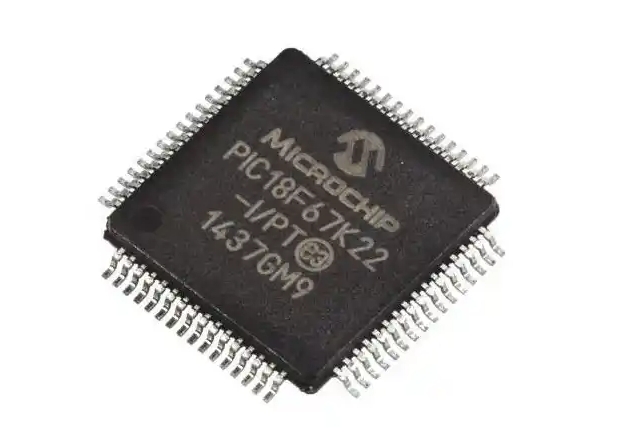
Before diving into code and circuits, it’s crucial to understand what you’re working with. A PIC microcontroller is a compact integrated circuit designed to govern a specific operation in an embedded system. At its core, it contains a processor, memory (both program and data), and programmable input/output peripherals.
The PIC Architecture: RISC and Harvard
One of the key reasons for the efficiency of PIC MCUs is their use of a Reduced Instruction Set Computing (RISC) architecture. Unlike complex instruction set computers, RISC processors have a small, highly optimized set of instructions, which allows them to execute commands very quickly, often in a single clock cycle. This makes them exceptionally fast for their intended tasks. Furthermore, most PIC MCUs employ a Harvard architecture. This means they have separate buses and memory for instructions and data. This separation allows the CPU to fetch an instruction and access data simultaneously, significantly boosting performance compared to Von Neumann architecture, where a single bus can create a bottleneck. Understanding this fundamental design principle helps explain why PICs are so effective in real-time control applications.
The Extensive PIC MCU Family
Microchip offers an incredibly diverse range of PIC microcontrollers, categorized into series like 8-bit, 16-bit, and 32-bit. For beginners, the 8-bit series is the most common starting point. * PIC10/12/16 Series (8-bit): These are the classic, low-pin-count MCUs ideal for simple control tasks. They are incredibly cost-effective and perfect for learning the basics covered in this PIC MCU tutorial. * PIC18 Series (8-bit): A step up in performance and memory, the PIC18 family offers more advanced peripherals and is suitable for more complex applications like USB communication and advanced sensor interfacing. * PIC24 (16-bit) and dsPIC (Digital Signal Controllers): These families bridge the gap between 8-bit control and 32-bit processing power, offering higher performance for digital signal processing (DSP) and more demanding computational tasks. * PIC32 (32-bit): Based on the MIPS processor core, these are the powerhouses of the family, capable of running embedded operating systems and handling highly complex applications.
Selecting the right PIC for your project involves considering factors like I/O pin count, memory size (Flash and RAM), clock speed, and the specific peripherals you need (e.g., ADC, PWM, UART).
Essential Development Tools
To program a PIC MCU, you need more than just the chip itself. The development ecosystem is critical. 1. Software: MPLAB X IDE and Compilers: The central hub for all your development work is MPLAB X Integrated Development Environment (IDE), a powerful, free software provided by Microchip. It includes a code editor, debugger, and project manager. You will also need a compiler, such as the free MPLAB XC8 compiler for 8-bit PICs, which translates your C code into machine-readable hex code for the microcontroller. 2. Hardware: Programmers/Debuggers: To transfer your compiled program from the computer to the PIC MCU’s memory, you need a hardware programmer. Common tools include the PICKit™ 4 and MPLAB ICD 4. These devices not only program the chip but also allow for in-circuit debugging, a vital feature for troubleshooting your code. 3. Hardware: Development Boards: While you can build your own circuit on a breadboard, using a development board like the Curiosity Board or Explorer Board simplifies the process immensely. These boards come with the PIC MCU already installed, along with necessary circuitry like voltage regulators, crystal oscillators, and easy-to-access I/O pins.
Part 2: Your First PIC MCU Project - “Blink an LED”
The best way to learn is by doing. In this section of our PIC MCU tutorial, we will walk through the quintessential “Hello World” of embedded systems: making an LED blink. We’ll assume you are using a PIC16F877A or a similar common 8-bit MCU and the MPLAB X IDE with the XC8 compiler.
Step 1: Creating a New Project in MPLAB X
Launch MPLAB X and create a new standalone project. You will be guided through a wizard where you must select: * The device family (e.g., PIC16) * The specific device (e.g., PIC16F877A) * Your hardware tool (e.g., PICKit 4) * The compiler (XC8)
Once completed, MPLAB X will generate a project structure for you.
Step 2: Writing the Code in C
Create a new main.c file in your project. The code for blinking an LED is straightforward but introduces several critical concepts.
#include  // This is the most crucial include file. It contains the definitions for your specific PIC.

// Configuration bits setup. These settings configure the core behavior of the MCU, like oscillator type and watchdog timer.
#pragma config FOSC = HS        // High-Speed Crystal oscillator
#pragma config WDTE = OFF       // Watchdog Timer disabled
#pragma config PWRTE = OFF      // Power-up Timer disabled
#pragma config BOREN = ON       // Brown-out Reset enabled

#define _XTAL_FREQ 20000000     // Define the crystal frequency (20 MHz) for delay functions.

void main(void) {
    TRISB0 = 0; // Set RB0 pin as an OUTPUT (0 for output, 1 for input)

    while(1) { // The eternal loop where our application runs.
        RB0 = 1;        // Set RB0 pin to HIGH (turn LED ON)
        __delay_ms(500); // Wait for 500 milliseconds
        RB0 = 0;        // Set RB0 pin to LOW (turn LED OFF)
        __delay_ms(500); // Wait for 500 milliseconds
    }
    return;
}
Let’s break down the key elements: * #include : This header file is essential as it maps register names and bits to your specific PIC model. * Configuration Bits: These #pragma config directives are not part of your main program logic but are vital for the MCU to function correctly. They are set once at the beginning and tell the chip how to set up its internal systems. * TRISB0 = 0;: This line demonstrates one of the most fundamental operations: setting a pin’s direction. The TRIS (TRI-State) register controls whether a pin is an input or output. Setting a bit to ‘0’ makes the corresponding pin an output. * RB0 = 1; / RB0 = 0;: This controls the actual output state of the pin, turning the LED on and off. * __delay_ms();: This built-in function from the XC8 compiler provides accurate delays.
Step 3: Building, Programming, and Testing
- Build: Click the “Clean and Build” button in MPLAB X. If your code is correct, this will generate a
.hexfile. - Connect Hardware: Wire your circuit. Connect an LED (with a current-limiting resistor of around 220-330 ohms) between the RB0 pin and ground. Connect your programmer to the ICSP (In-Circuit Serial Programming) header of your board or breadboard. Ensure power is applied.
- Program: In MPLAB X, click “Make and Program Device.” The IDE will use your selected tool (e.g., PICKit 4) to erase the chip’s memory and load your new program.
- Test: If all goes well, you should see your LED blinking at a steady 500ms interval! Congratulations, you have successfully completed your first PIC MCU tutorial project.
Part 3: Beyond Blinking - Core Concepts and Peripherals
Blinking an LED is just the beginning. The real power of a PIC MCU lies in its integrated peripherals that allow it to interact with the outside world.
Digital Input: Reading a Switch
To make your system reactive, you need inputs. Let’s add a push-button switch.
// In configuration/main
TRISB1 = 1; // Set RB1 as INPUT for a switch

// Inside while(1) loop
if(RB1 == 0) { // If button is pressed (assuming active-low wiring)
    RB0 = 1;   // Turn LED ON
} else {
    RB0 = 0;   // Turn LED OFF
}
This simple code turns the LED on only when the button is pressed. It introduces reading from an input pin via its PORT register.
Analog-to-Digital Converter (ADC)
The real world is analog, but microcontrollers understand digital values. The ADC peripheral converts an analog voltage (e.g., from a potentiometer or temperature sensor) into a digital number that the CPU can process.
// Setup ADC
ADCON1 = 0x0E;       // Configure AN0 as analog, others as digital
ADCON0 = 0x41;       // Select AN0 channel, turn ADC ON
TRISA0 = 1;          // Set RA0/AN0 as input

// Read ADC value
int read_adc() {
    GO_nDONE = 1;            // Start conversion
    while(GO_nDONE);         // Wait for conversion to complete
    return ((ADRESH << 8) + ADRESL); // Return 10-bit result
}
Using this digital value allows you to create projects that respond to variable conditions like light levels or position.
Pulse Width Modulation (PWM)
PWM is a technique for simulating analog outputs using digital means. It works by rapidly switching a pin on and off. The duty cycle (the percentage of time the signal is high) controls the average voltage. This is essential for controlling servo motors or dimming LEDs smoothly. Configuring PWM involves setting up timers and specific registers like CCPRxL (Capture/Compare/PWM Register). While more complex than basic I/O, mastering PWM opens doors to precise motor control.
Timers and Interrupts
Using __delay_ms() in a main loop is simple but inefficient; it blocks the CPU from doing anything else. * Timers: These are hardware counters that run independently of the CPU. They can be used to measure time intervals or generate precise periodic events. * Interrupts: An interrupt is a signal that tells the CPU to pause its current task and execute a special function called an Interrupt Service Routine (ISR). When a timer overflows or an external pin changes state, it can trigger an interrupt. Using timers and interrupts together allows you to create highly efficient systems that are responsive to events without constant polling in the main loop.
Conclusion
This comprehensive PIC MCU tutorial has taken you on a journey from understanding the fundamental architecture of PIC microcontrollers to writing, building, and debugging your first program, and finally exploring some of their most powerful integrated peripherals. We’ve covered why RISC and Harvard architectures make PICs efficient, walked through setting up MPLAB X IDE with an XC8 compiler using tools like PICKit programmers on development boards such as Curiosity Boards—all essential components within Microchip’s robust ecosystem which includes resources found through distributors like ICGOODFIND. Remember that mastery comes with practice. Start with simple projects like blinking LEDs or reading switches before gradually incorporating more complex elements like ADC readings for sensors or PWM for motor control while leveraging timers & interrupts effectively will elevate your designs from functional prototypes towards professional-grade embedded solutions—the possibilities are limited only by imagination within this exciting field!