MSP430 MCU Tutorial: A Comprehensive Guide for Beginners
Introduction
The MSP430 microcontroller from Texas Instruments represents one of the most successful families in the embedded systems world, particularly renowned for its ultra-low-power capabilities. For engineers, students, and hobbyists embarking on embedded projects requiring minimal energy consumption, the MSP430 offers an exceptional blend of performance, peripherals, and power efficiency. This tutorial serves as a definitive guide to navigating the MSP430 ecosystem, from understanding its core architecture to writing, compiling, and debugging your first application. Whether you’re developing a battery-powered sensor node, a medical device, or simply expanding your microcontroller expertise, mastering the MSP430 opens doors to creating innovative, energy-conscious designs. Throughout this guide, we will explore practical examples and fundamental concepts that form the bedrock of MSP430 development.
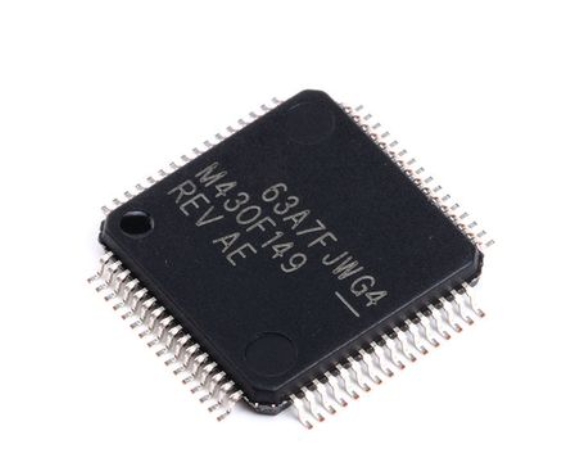
The journey into embedded systems with the MSP430 can seem daunting initially, but its well-documented architecture and supportive development tools significantly lower the entry barrier. This tutorial aims to demystify the process by providing a structured approach to learning. We will start with the hardware fundamentals, move into the software development environment setup, and culminate with hands-on programming examples. By the end of this guide, you will have acquired the foundational knowledge needed to independently create and manage MSP430-based projects. For those seeking specialized components or development kits to complement their learning, platforms like ICGOODFIND can be invaluable resources for sourcing genuine parts and tools.
Part 1: Understanding the MSP430 Hardware Architecture
At the heart of any MSP430 tutorial lies a thorough understanding of its hardware architecture, which is specifically designed for low-power operation. The MSP430 CPU employs a 16-bit RISC architecture, which means it uses a simple, highly optimized set of instructions. This simplicity allows for faster execution and reduced power consumption compared to more complex architectures. The CPU is complemented by a variety of addressing modes that provide flexibility in accessing memory and peripherals, making C programming highly efficient while still allowing for precise assembly-level control when needed for optimization.
One of the most distinctive features of the MSP430 family is its ultra-low-power consumption profile, achieved through several innovative design elements. The microcontroller incorporates multiple low-power modes (LPM0 to LPM4), each selectively turning off different clock domains and functional units to conserve energy while maintaining the ability to wake quickly via interrupts. The advanced clock system allows dynamic switching between various clock sources—including high-frequency master clocks and low-frequency auxiliary clocks—enabling the processor to run at the minimum speed required for a given task, thereby extending battery life in portable applications significantly.
The peripheral set integrated into MSP430 microcontrollers is remarkably comprehensive, reducing external component count and overall system cost. Nearly all variants include digital I/O ports with interrupt capability, multiple 16-bit timers capable of PWM generation and input capture/compare functions, hardware UART, SPI, and I2C communication interfaces, and often an analog-to-digital converter (ADC) with 10-12 bit resolution. Higher-end models may include additional peripherals such as USB controllers, LCD drivers, operational amplifiers, and DMA controllers that can transfer data between peripherals and memory without CPU intervention, further reducing active power consumption.
Memory organization in the MSP430 follows a straightforward von Neumann architecture, where program memory, data memory, and peripherals all share a common bus structure. The unified memory map simplifies programming as both code and data reside in a single address space. Most devices feature Flash memory for program storage (allowing field firmware updates) and RAM for data manipulation. The peripherals are memory-mapped, meaning they are controlled by reading from and writing to specific addresses in this unified space—a consistent approach that makes peripheral configuration intuitive once you understand the basic principle.
Part 2: Setting Up the Development Environment
Before writing your first line of code for the MSP430, you must establish a proper development environment. The cornerstone of MSP430 software development is Code Composer Studio (CCS), Texas Instruments’ full-featured integrated development environment (IDE). CCS provides a comprehensive suite of tools including a project manager, C/C++ compiler, assembler, linker, and debugger specifically optimized for TI microcontrollers. The installation process is straightforward: download the IDE from TI’s website, select the MSP430 compiler tools during setup, and you’ll have a complete development platform ready for your projects.
For developers preferring a lighter-weight alternative or command-line interface, MSP430-GCC, the open-source GNU toolchain for MSP430, offers a compelling option. This toolchain can be integrated with various editors or used with makefiles for build automation. When combined with debugging tools like MSP-FET programmers or simpler interfaces like GoodFET, it provides a flexible development workflow outside the CCS ecosystem. Additionally, Energia—an Arduino-like framework for MSP430—simplifies the learning process with its wiring-based library functions and simplified IDE, making it particularly accessible for beginners transitioning from Arduino platforms.
Hardwise setup requires connecting your MSP430 target board to your computer using a programming debug interface. The most common options are the MSP-FET debugger, which provides both JTAG and Spy-Bi-Wire (a two-wire JTAG alternative) interfaces, or simpler boards like the LaunchPad development kits that include integrated emulation circuitry. Proper connection typically involves just four wires: VCC, GND, and two debug lines (TEST/SBWTCK and RST/SBWTDIO). Many modern LaunchPad boards simplify this further with onboard USB-to-serial conversion that handles both programming and serial communication through a single cable.
Creating your first project involves several systematic steps: start by selecting the correct target device in your IDE to ensure proper compiler settings and peripheral definitions; configure project properties including optimization levels and memory model; establish basic code templates with essential header files and initialization routines; set up debug configurations specifying connection type and speed; and finally implement version control integration if working on larger projects. Taking time to properly organize your development environment at this stage pays significant dividends throughout your project lifecycle in terms of debugging efficiency and code maintenance.
Part 3: Programming Fundamentals with Practical Examples
The most fundamental aspect of MSP430 programming involves controlling General Purpose Input/Output (GPIO) pins, which serve as the interface between the microcontroller and external components like LEDs, buttons, and sensors. Each port on the MSP430 contains multiple configurable pins whose direction (input or output) is controlled by direction registers (PxDIR), while their state is read from or written to data registers (PxIN/PxOUT). Additionally, function select registers (PxSEL) determine whether pins serve as general I/O or specialized peripheral functions. A basic “blink LED” program demonstrates these concepts:
#include

int main(void) {
    WDTCTL = WDTPW | WDTHOLD;     // Stop watchdog timer
    P1DIR |= BIT0;                // Set P1.0 as output

    while(1) {
        P1OUT ^= BIT0;            // Toggle P1.0
        __delay_cycles(100000);   // Simple delay
    }
}
This simple example illustrates essential concepts: header file inclusion, watchdog timer disabling (a crucial step in MSP430 programs), GPIO configuration, and basic output toggling with a software delay.
Moving beyond simple GPIO control, effective MSP430 programming leverages interrupts and low-power modes to create responsive yet power-efficient applications. Unlike polling methods that continuously check status flags, interrupts allow the CPU to enter low-power sleep modes until an external event (like a button press) or internal peripheral event (like timer expiration) triggers program execution to resume. Configuring interrupts involves enabling them globally, setting up specific interrupt sources (like GPIO edge detection), and writing corresponding interrupt service routines (ISRs). The following example demonstrates handling a button press interrupt:
#include

int main(void) {
    WDTCTL = WDTPW | WDTHOLD;
    P1DIR |= BIT0;                // P1.0 LED output
    P1IE |= BIT3;                 // P1.3 interrupt enabled
    P1IES |= BIT3;                // P1.3 Hi/lo edge
    P1IFG &= ~BIT3;               // P1.3 IFG cleared

    __bis_SR_register(LPM4_bits | GIE); // Enter LPM4 with interrupts
}

// Port 1 interrupt service routine
#pragma vector=PORT1_VECTOR
__interrupt void Port_1(void) {
    P1OUT ^= BIT0;                // Toggle P1.0
    P1IFG &= ~BIT3;               // Clear P1.3 interrupt flag
}
This code demonstrates how the microcontroller spends most of its time in low-power mode 4 (LPM4), consuming minimal current until the button connected to P1.3 is pressed—at which point it wakes briefly to toggle the LED before returning to sleep.
Peripheral utilization represents another critical programming domain where developers configure built-in hardware modules to handle tasks without constant CPU supervision. The Timer_A module, for instance, can generate precise PWM signals for controlling servo motors or dimming LEDs while the CPU sleeps:
#include

int main(void) {
    WDTCTL = WDTPW | WDTHOLD;
    P1DIR |= BIT6;                // P1.6 output
    P1SEL |= BIT6;                // P1.6 Timer_A option

    // Configure Timer_A
    TA0CCR0 = 1000-1;             // PWM Period
    TA0CCTL1 = OUTMOD_7;          // Reset/set mode
    TA0CCR1 = 500;                // 50% duty cycle
    TA0CTL = TASSEL_2 | MC_1;     // SMCLK, up mode

    __bis_SR_register(LPM0_bits); // Enter LPM0
}
Similarly, analog-to-digital conversion enables reading sensor values from temperature sensors, potentiometers, or light sensors:
#include

int main(void) {
    WDTCTL = WDTPW | WDTHOLD;

    // Configure ADC10
    ADC10CTL0 = SREF_0 | ADC10SHT_2 | ADC10ON;
    ADC10CTL1 = INCH_0 | SHS_0 | ADC10DIV_0 | ADC10SSEL_0 | CONSEQ_0;
    ADC10AE0 |= BIT0;             // Enable analog input on A0

    while(1) {
        ADC10CTL0 |= ENC | ADC10SC;     // Start conversion
        while(ADC10CTL1 & ADC10BUSY);   // Wait for completion
        int result = ADC10MEM;           // Read result

        __delay_cycles(100000);         // Delay between conversions
    }
}
These examples demonstrate how leveraging built-in peripherals significantly reduces CPU workload while enabling sophisticated functionality—a key strategy in maximizing battery life in MSP430 applications.
Conclusion
The MSP430 microcontroller family offers an exceptional platform for developing power-efficient embedded systems across diverse applications from industrial monitoring to consumer wearables. Throughout this tutorial, we’ve explored the fundamental aspects of MSP430 development: its power-optimized hardware architecture featuring multiple low-power modes and versatile peripherals; establishing a robust development environment using tools like Code Composer Studio or open-source alternatives; and practical programming techniques spanning GPIO control through interrupt-driven designs and peripheral utilization. Mastering these foundational concepts empowers developers to create sophisticated applications that maximize functionality while minimizing energy consumption—the hallmark of successful embedded designs.
As you continue your journey with the MSP430 platform beyond this introductory tutorial remember that proficiency comes through consistent practice and project experimentation Start with simple LED blinking exercises progressively incorporating more complex elements like timer-based scheduling communication protocols (UART SPI I2C) and advanced power management techniques The extensive MSP430 documentation including family user guides device-specific datasheets and application reports provides invaluable reference material as your projects grow in complexity Additionally developer communities such as the TI E2E support forums offer collective knowledge when facing particularly challenging design obstacles For sourcing reliable components development boards or specialized modules services like ICGOODFIND can streamline your procurement process ensuring you have access to genuine parts for your prototyping and production needs With its balanced combination of performance peripheral integration industry-leading power efficiency and comprehensive development support ecosystem the MSP430 remains an outstanding choice for embedded systems engineers seeking optimal solutions for their energy-conscious applications.