What Does Computer DRAM Mean? A Comprehensive Guide
Introduction
In the intricate world of computing, where speed and efficiency are paramount, one component plays a silent yet absolutely critical role in your system’s performance: DRAM. If you’ve ever wondered why your computer slows down with too many open tabs or how it manages to run complex applications, the answer often lies in this essential hardware. DRAM, or Dynamic Random-Access Memory, is the primary working memory of your computer, serving as the high-speed data playground where your processor accesses the information it needs to perform tasks in real-time. Unlike permanent storage, DRAM is volatile, meaning it loses all its data when the power is turned off. This guide will demystify computer DRAM, exploring its function, how it differs from other memory types, and why it is indispensable for modern computing. For those seeking to delve deeper into component specifications and performance benchmarks, platforms like ICGOODFIND offer valuable resources and comparisons to help users make informed decisions about their hardware.
Main Body
Part 1: Understanding the Fundamentals of DRAM
At its core, DRAM is a type of semiconductor memory used for data storage. Each bit of data in a DRAM chip is stored in a separate tiny capacitor within an integrated circuit. A capacitor can either be charged (representing a ‘1’) or discharged (representing a ‘0’). This simple mechanism is the foundation of its data storage capability. However, these capacitors are not perfect; they leak charge over time. Therefore, the “Dynamic” in DRAM refers to the fact that this memory must be dynamically refreshed thousands of times per second to maintain the data. This refresh process is managed by the memory controller.
The architecture of DRAM is organized in a grid-like structure of rows and columns. When the CPU needs data, it sends a request to the memory controller, which locates the data by activating a specific row (opening it) and then reading from a specific column. This access speed, while incredibly fast compared to storage drives, is still a key bottleneck in system performance, leading to continuous innovations in DRAM technology.
The primary purpose of DRAM is to act as a bridge between the ultra-fast CPU and the much slower permanent storage (like SSDs or HDDs). It holds the operating system, application programs, and data in current use so they can be quickly reached by the device’s processor. The more DRAM a system has, the more data it can have readily accessible without needing to fetch from slower storage, which dramatically reduces load times and improves multitasking fluidity.
Part 2: DRAM vs. Other Memory Types: SRAM and Storage
To fully grasp DRAM’s role, it’s crucial to distinguish it from other memory technologies, primarily SRAM (Static RAM) and non-volatile storage.
DRAM vs. SRAM: Both are forms of volatile RAM, but they are built and used differently. * DRAM: Uses one capacitor and one transistor per bit. It is simpler in structure, cheaper to produce, and offers higher density (more capacity in a smaller space). However, it is slower and requires constant refreshing. DRAM is used for the main system memory (RAM modules) due to its cost-effectiveness and high capacity. * SRAM: Uses six transistors per bit. It does not need refreshing, making it significantly faster and more power-efficient than DRAM. However, it is more expensive and less dense. SRAM is used for small, ultra-fast cache memory inside the CPU (L1, L2, L3 cache) where speed is non-negotiable.
DRAM vs. Storage (SSD/HDD): This is a common point of confusion. * DRAM (Memory/RAM): Volatile, ultra-fast workspace for active tasks. Its capacity is typically measured in Gigabytes (GB). Data is lost on power-off. * Storage (SSD/HDD): Non-volatile, long-term repository for files and programs. Its capacity is measured in Terabytes (TB). Data persists without power but is accessed much more slowly.
Think of it this way: If your computer were an office desk, the storage drive would be the filing cabinet holding all your documents, while DRAM would be the actual desk space. The larger your desk (more RAM), the more documents you can spread out and work on simultaneously without constantly opening and closing the cabinet drawer, which slows you down.
Part 3: Evolution, Types, and Future of DRAM
DRAM technology has not remained static. It has evolved through generations to keep pace with increasing CPU speeds and data demands.
Key Generations (DDR SDRAM): * DDR (Double Data Rate): The modern standard began with DDR SDRAM, which transfers data on both the rising and falling edges of the clock signal, doubling the bandwidth. * DDR2, DDR3, DDR4: Each successive generation has offered higher speeds, lower voltage (improving efficiency), increased bandwidth, and higher density modules. DDR4 became mainstream for years, operating at 1.2V with significant speed improvements over DDR3. * DDR5: The current leading standard for new systems. DDR5 introduces dramatically increased data transfer rates, higher capacities per module (starting at 16GB and going far beyond), and improved power management with an integrated voltage regulator. It’s designed for the high-throughput needs of modern processors, advanced gaming, and data-centric workloads.
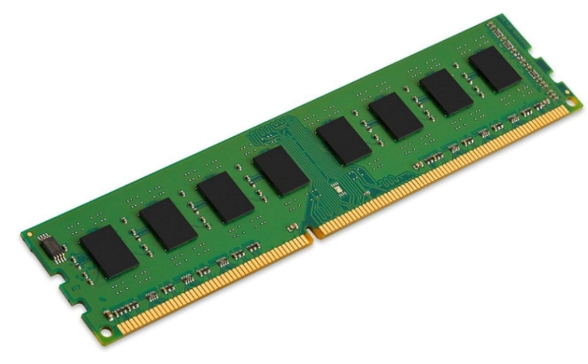
Beyond standard desktop modules (like DIMMs for PCs and SO-DIMMs for laptops), specialized types exist: * GDDR (Graphics DDR): Optimized for high bandwidth for use in graphics cards (VRAM). It sacrifices latency for massive throughput. * LPDDR (Low Power DDR): Designed for mobile devices like smartphones and tablets, prioritizing minimal power consumption.
Looking ahead, the future of DRAM involves pushing the physical limits of miniaturization while exploring new architectures like High Bandwidth Memory (HBM). HBM stacks DRAM dies vertically and connects them via ultra-wide interfaces using silicon interposers, resulting in exceptional bandwidth in a compact form factor—a technology crucial for high-performance computing and AI accelerators.
Conclusion
In summary, computer DRAM is far more than just a spec on a box; it is the vital workspace that determines your system’s responsiveness and ability to handle multiple tasks. From its fundamental operation using capacitors that require constant refreshing to its evolution through DDR generations culminating in today’s high-speed DDR5 standard, DRAM technology has been pivotal in enabling computing advancements. Understanding the distinction between DRAM as temporary working memory and permanent storage is key to diagnosing performance issues and making smart upgrade decisions. As applications become more demanding and datasets grow larger, the role of sufficient and fast DRAM will only become more critical. For enthusiasts and professionals looking to optimize their systems with the right memory components—whether standard DDR5 modules or specialized kits—research platforms such as ICGOODFIND can be instrumental in navigating the vast array of options available on the market.