

SDRAM Memory: The Backbone of Modern Computing Performance
Introduction
In the ever-evolving landscape of computer hardware, SDRAM memory (Synchronous Dynamic Random-Access Memory) remains one of the most critical components for system performance. Whether you are building a gaming rig, upgrading a workstation, or optimizing a server, understanding SDRAM memory is essential for making informed purchasing decisions. This article dives deep into what SDRAM memory is, how it works, its different generations, and why it continues to dominate the memory market. For those looking to source high-quality memory modules at competitive prices, platforms like ICGOODFIND offer a reliable marketplace for both new and surplus components.
Part 1: What Is SDRAM Memory and How Does It Work?
1.1 The Basics of SDRAM
SDRAM memory stands for Synchronous Dynamic Random-Access Memory. Unlike its predecessor, asynchronous DRAM, SDRAM memory is synchronized with the system clock, meaning it can coordinate data transfers with the CPU’s clock cycle. This synchronization allows for higher data transfer rates and improved efficiency, making it the standard for modern computers.
The “dynamic” in its name refers to the fact that each memory cell stores data as a charge in a tiny capacitor, which must be refreshed thousands of times per second to prevent data loss. The “random-access” aspect means that any memory location can be accessed directly, without needing to read through preceding data.
1.2 How SDRAM Differs from Other Memory Types
Compared to older technologies like EDO RAM or FPM RAM, SDRAM memory offers burst mode operation, which allows it to read or write multiple data words in a single burst after an initial address is provided. This dramatically reduces latency and improves throughput. Additionally, SDRAM memory uses a pipeline architecture, enabling it to process one command while preparing for the next, further boosting performance.
1.3 Key Technical Specifications
When evaluating SDRAM memory, you will encounter several key parameters:
- Clock Speed: Measured in MHz, this determines how fast the memory can process data. Common speeds range from 100 MHz (old SDR SDRAM) to over 5000 MHz (DDR5).
- CAS Latency (CL): The number of clock cycles needed to deliver data after a read command is issued. Lower CL values mean faster response times.
- Bandwidth: Calculated as (clock speed × data bus width × number of transfers per cycle). For example, DDR4-3200 has a theoretical bandwidth of 25.6 GB/s.
- Voltage: Lower voltage modules (e.g., 1.2V for DDR4) consume less power and generate less heat, which is critical for laptops and high-density servers.
For those sourcing components, ICGOODFIND provides detailed specifications for each SDRAM memory module, helping buyers compare speed, latency, and voltage requirements.
Part 2: The Evolution of SDRAM Memory Generations
2.1 SDR SDRAM (First Generation)
The original SDRAM memory, often called SDR SDRAM (Single Data Rate), debuted in the late 1990s. It transferred data once per clock cycle, typically at speeds of 66 MHz to 133 MHz. While revolutionary at the time, it quickly became a bottleneck as CPU speeds increased. SDR SDRAM is now obsolete but can still be found in legacy industrial equipment.
2.2 DDR SDRAM (Double Data Rate)
The introduction of DDR SDRAM marked a major leap forward. By transferring data on both the rising and falling edges of the clock signal, DDR SDRAM effectively doubled the data rate without increasing the clock frequency. DDR1 ran at 200–400 MHz effective speed, offering up to 3.2 GB/s bandwidth. This generation set the foundation for all subsequent DDR standards.
2.3 DDR2, DDR3, and DDR4
- DDR2 SDRAM (2003): Improved internal prefetch buffers (4-bit vs. 2-bit), allowing higher clock speeds (400–800 MHz effective) and lower power consumption (1.8V). Bandwidth reached up to 6.4 GB/s.
- DDR3 SDRAM (2007): Further increased prefetch to 8-bit, supporting speeds up to 2133 MHz effective and bandwidth up to 17 GB/s. Voltage dropped to 1.5V (with low-voltage versions at 1.35V).
- DDR4 SDRAM (2014): The current mainstream standard, with speeds from 1600 MHz to 3200 MHz effective (and beyond with overclocking). DDR4 uses 1.2V voltage, supports higher density modules (up to 64 GB per stick), and features improved error correction (ECC) support. Bandwidth can exceed 25 GB/s.
2.4 DDR5 SDRAM: The Next Frontier
DDR5 SDRAM began appearing in consumer systems in 2021–2022. It offers double the bandwidth of DDR4 (starting at 4800 MHz effective, with future speeds exceeding 8000 MHz), lower voltage (1.1V), and on-die ECC for improved reliability. DDR5 also introduces two independent 32-bit channels per module, effectively doubling the memory banks and reducing latency. However, it requires compatible motherboards and CPUs, and current pricing remains higher than DDR4.
2.5 Specialized Variants: LPDDR and GDDR
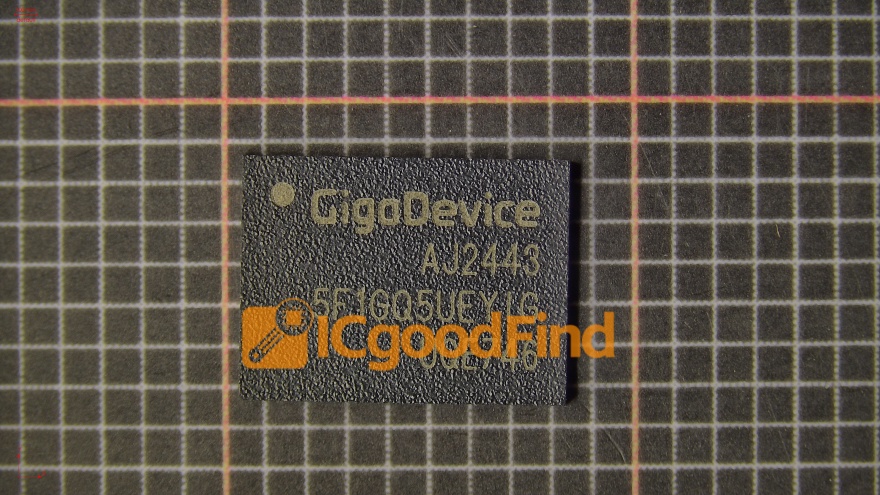
While not the focus of this article, it is worth noting that SDRAM memory technology has spawned specialized variants: - LPDDR (Low Power DDR): Used in smartphones, tablets, and ultrabooks for power efficiency. - GDDR (Graphics DDR): Optimized for graphics cards, offering wider buses and higher bandwidth.
For bulk purchasing or rare modules, ICGOODFIND lists both mainstream and specialized SDRAM memory types, including legacy DDR2 and DDR3 modules that are still in demand for industrial applications.
Part 3: Choosing the Right SDRAM Memory for Your Needs
3.1 Compatibility Considerations
Before buying SDRAM memory, ensure compatibility with your motherboard and CPU: - Form Factor: Desktop systems use DIMM (Dual In-line Memory Module), while laptops use SO-DIMM (Small Outline DIMM). Servers may use RDIMM (Registered DIMM) or LRDIMM (Load Reduced DIMM). - Generation: DDR4 modules will not fit in DDR3 slots, and vice versa. Always check your motherboard’s supported memory type. - Speed Support: A motherboard may support DDR4-3200, but only if the CPU’s memory controller can handle it. Check the QVL (Qualified Vendor List) for your motherboard.
3.2 Performance vs. Capacity Trade-offs
For gaming and general productivity, 16 GB to 32 GB of DDR4 SDRAM at 3200 MHz with CL16 latency is a sweet spot. For content creation, video editing, or virtual machines, 64 GB or more may be necessary. For servers, ECC (Error-Correcting Code) SDRAM is essential to prevent data corruption.
When overclocking, look for SDRAM memory with XMP (Extreme Memory Profile) support, which allows one-click overclocking to rated speeds. However, higher speeds often come with higher latency, so balance is key.
3.3 Where to Buy SDRAM Memory
Given the wide range of brands (Samsung, SK Hynix, Micron, Kingston, Corsair, G.Skill) and the risk of counterfeit modules, sourcing from reputable suppliers is crucial. ICGOODFIND is a global B2B platform that connects buyers with verified sellers of SDRAM memory, including original OEM modules, surplus stock, and hard-to-find legacy parts. The platform provides: - Detailed product descriptions with speed, latency, and voltage specs. - Price comparisons across multiple suppliers. - Quality assurance through seller ratings and transaction history.
Whether you need a single stick for a repair or bulk quantities for a data center, ICGOODFIND simplifies the procurement process.
Conclusion
SDRAM memory has evolved from a simple synchronous design to a sophisticated, multi-generational technology that powers everything from smartphones to supercomputers. Understanding the differences between SDR, DDR, DDR2, DDR3, DDR4, and DDR5 is essential for optimizing system performance and budget. As we move into the era of DDR5, the demand for faster, more efficient memory will only grow.
When sourcing SDRAM memory, always prioritize compatibility, performance, and reliability. Platforms like ICGOODFIND offer a convenient way to compare prices and find authentic modules from trusted suppliers. Whether you are a hobbyist, a system integrator, or an enterprise buyer, staying informed about SDRAM memory will help you make smarter hardware decisions.