

The Ultimate Guide to MCU LCD (Liquid Crystal Display): Technology, Integration, and Optimization
Introduction
In the realm of embedded systems and consumer electronics, the marriage between a Microcontroller Unit (MCU) and a Liquid Crystal Display (LCD) forms the cornerstone of countless modern devices. From smart home thermostats and industrial control panels to wearable fitness trackers and automotive dashboards, MCU-driven LCDs are the primary interface for human-machine interaction (HMI). This synergy enables devices to present vital information, receive user input, and operate within strict power and cost constraints. As technology advances, the integration of MCUs with various LCD types—from simple character displays to sophisticated TFT modules—has become more sophisticated yet more accessible. This article delves deep into the world of MCU LCD technology, exploring its core principles, critical integration challenges, and best practices for optimal performance. For engineers and developers seeking reliable components and integration insights, platforms like ICGOODFIND serve as invaluable resources, offering comprehensive component data, supplier links, and technical support to streamline the development process.
Part 1: Understanding MCU LCD Technology and Its Core Components
At its heart, an MCU LCD system involves a microcontroller communicating with and controlling a liquid crystal display module. The MCU acts as the brain, executing code to process data and generate signals that dictate what appears on the screen. The LCD module itself is a complex assembly comprising the glass panel containing liquid crystals, a backlight (for most types), a driver IC, and a controller.
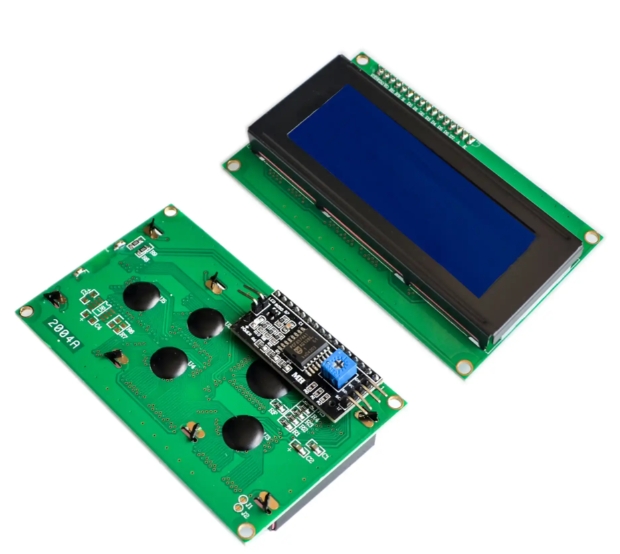
The choice of LCD technology is paramount and depends heavily on the application’s requirements. Common types include: * Character LCDs: Simple, low-cost modules that display alphanumeric characters and basic symbols. They are typically controlled via parallel (e.g., HD44780 standard) or I2C interfaces. * Graphical LCDs (GLCD): These displays, often monochrome, allow control over individual pixels. They are used for custom graphics, icons, and complex data visualization. Interfaces include parallel and serial protocols like SPI. * TFT LCDs (Thin-Film Transistor): The most advanced type discussed here, offering full-color, high-resolution images with fast refresh rates. Each pixel is controlled by one to four transistors. Integrating a TFT LCD with an MCU is more complex, often requiring a dedicated graphics controller or an MCU with a built-in TFT interface (FSMC/FMC on ARM Cortex-M chips) and significant RAM.
The communication interface between the MCU and the LCD driver is a critical design decision. Parallel interfaces offer speed but consume numerous GPIO pins. Serial interfaces like SPI and I2C save pins but may have lower data transfer rates, which is a key consideration for updating graphical or video content. Modern high-performance MCUs may even integrate MIPI DSI controllers for direct connection to advanced displays.
Part 2: Key Challenges and Best Practices in MCU-LCD Integration
Successfully integrating an LCD with an MCU goes beyond simple electrical connection. Developers must navigate several technical hurdles to ensure a stable, efficient, and readable display system.
1. Memory and Processing Power Constraints: This is arguably the biggest challenge. Bitmap graphics and fonts consume substantial ROM (flash memory). Dynamic graphics require RAM for frame buffers. Selecting an MCU with sufficient memory (both Flash and RAM) and a CPU core powerful enough to handle the desired graphics operations is non-negotiable. For complex TFT displays, using external RAM or a display module with its own built-in GRAM (Graphics RAM) can offload the MCU.
2. Power Consumption Optimization: Displays, especially their backlights, are major power consumers in embedded systems. Effective strategies include: * Utilizing low-power display technologies like reflective LCDs that don’t need a backlight. * Implementing dynamic backlight control through PWM signals from the MCU. * Leveraging the MCU’s sleep modes and the display’s sleep/standby commands during idle periods. * Optimizing software to refresh the display only when necessary, minimizing active time.
3. Electromagnetic Interference (EMI) and Signal Integrity: The high-speed signals driving an LCD, particularly parallel interfaces to TFTs, are susceptible to noise and can themselves be sources of EMI. Proper PCB layout practices are crucial: keep traces short, use ground planes, avoid running display signals near sensitive analog circuits, and consider using series termination resistors on data lines.
4. Software Architecture and Libraries: Writing efficient display drivers from scratch is time-intensive. Utilizing proven middleware or graphics libraries (like LVGL, emWin, or TouchGFX) can dramatically accelerate development. These libraries offer optimized functions for drawing shapes, rendering text, creating touch interfaces, and managing animations, allowing developers to focus on application logic rather than low-level pixel manipulation.
Part 3: Future Trends and Advanced Considerations
The landscape of MCU-LCD integration is continuously evolving. Emerging trends are pushing the boundaries of what’s possible in embedded displays.
The rise of smarter display modules is a significant trend. Many modern LCD modules now come with an integrated “graphics controller” MCU (like the ILI9341 or SSD1306 for OLEDs). In this setup, the main application MCU sends high-level commands (e.g., “draw a box at these coordinates”) via SPI/UART, and the onboard controller handles all the intensive pixel-driving tasks. This drastically reduces the computational burden on the main MCU.
Another frontier is the integration of capacitive touch sensing. Modern user interfaces demand intuitive touch input. Many MCUs now feature built-in capacitive touch sensing peripherals (CapSense), or dedicated touch controller ICs can be used alongside the display. Creating a responsive and reliable touch interface requires careful calibration and noise filtering algorithms in software.
Furthermore, the demand for higher resolution, color depth, and faster refresh rates within power-constrained devices continues to grow. This drives innovation in both low-power display technologies (like Memory-in-Pixel displays) and more powerful microcontroller families that include dedicated display subsystems and hardware accelerators for graphics operations.
Conclusion
The effective integration of an MCU with an LCD is a multifaceted engineering task that sits at the intersection of hardware design, software development, and power management. From selecting the appropriate display technology and interface to overcoming memory limitations and mitigating EMI, each step requires careful consideration. By understanding the core components, adhering to best practices in PCB layout and software architecture, and leveraging existing libraries and smarter modular components, developers can create robust and efficient embedded display systems. As technology progresses towards smarter modules and richer interfaces, staying informed about components becomes even more critical. For sourcing reliable displays, compatible drivers, and powerful microcontrollers—or simply finding detailed datasheets and application notes—platforms like ICGOODFIND provide essential support for engineers navigating this complex field.







